Casino shuttle management — from WhatsApp & spreadsheets to a single platform

Casino operations teams were managing player shuttles across WhatsApp groups, Excel sheets, and phone calls. Operators were unverified, schedules were missed, and real-time updates simply didn't exist.
CasGo was built to replace that chaos with a single B2B platform — giving casino admins control over operators, vehicles, agreements, schedules, and live tracking in one place. The challenge wasn't just building software; it was understanding a complex operational reality well enough to simplify it.
Casino shuttles run on tight schedules with real-money stakes. A missed pickup means a player who didn't make it to the floor. A lost tracking update means an operator running the wrong route. The cost of poor tooling is measured in revenue, not just inconvenience.
Employers spent hours creating and verifying new operators with no centralised record. There was no way to see which operators were active, which routes they were approved for, or whether their documentation was current.
Manually checking books to confirm whether an operator was registered for a route or not. Outdated agreements caused operators to run routes they were no longer contracted for — with no automated checks in place.
Operators often changed operation areas based on demand — and there was no visibility into which agreement was currently active or where any vehicle was. The team was always operating blind.
Trip scheduling and changes were communicated through group chats and phone calls. There was no single source of truth for the day's schedule — just messages scattered across threads that were impossible to audit.
Casino operations teams currently manage transport via spreadsheets, WhatsApp groups, or manual calls. Real-time updates are missing.
Employers spend hours creating and verifying new operators with no centralised record.
Manually checking books to confirm whether an operator is registered for a route — every single time.
Operators change operation areas with no visibility into which agreement is currently active.
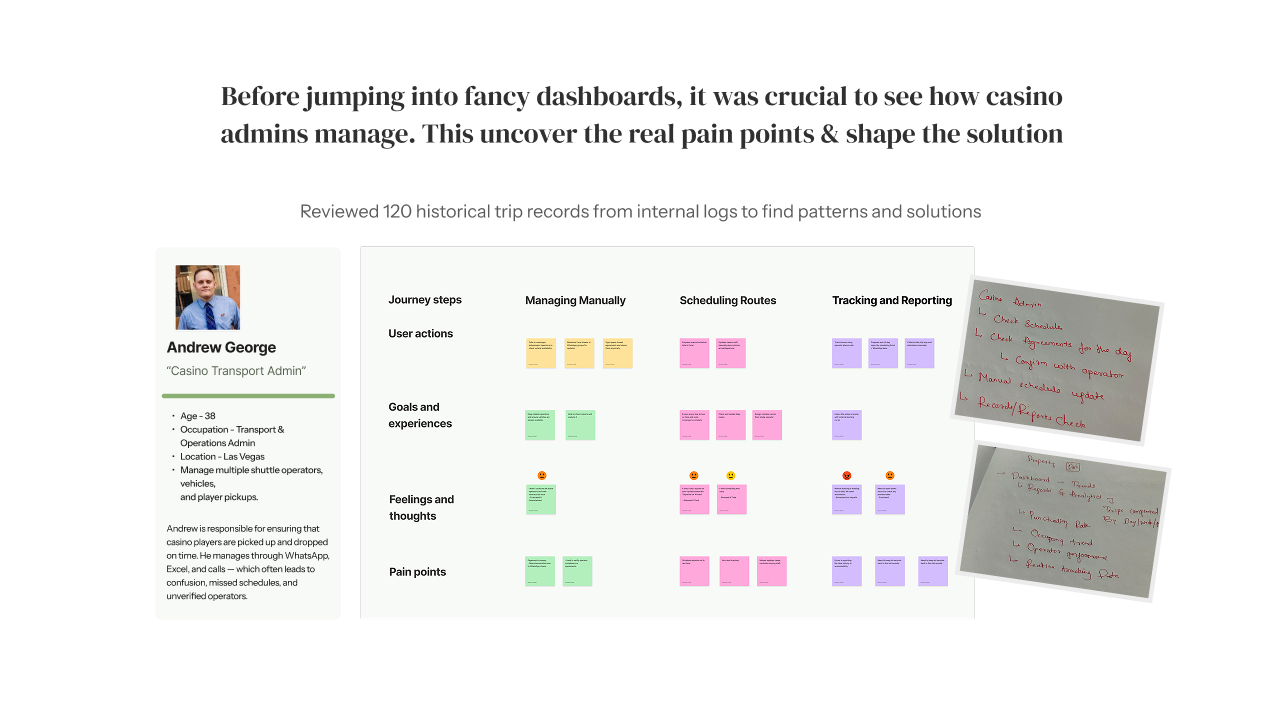
Persona + journey map — 120 historical trip records reviewed to surface real patterns
Transport & Operations Admin, Las Vegas. Manages multiple shuttle operators, vehicles, and player pickups daily — entirely through WhatsApp, Excel, and calls. Constantly firefighting missed trips, unverified operators, and stale schedules.
Managing Manually → Scheduling Routes → Tracking & Reporting. Pain was concentrated at agreement verification and live schedule updates — the two moments where the current tools failed hardest.
Internal logs surfaced the patterns: most delays traced back to operator onboarding gaps and no live status visibility during active runs. The data confirmed what the persona sessions revealed.
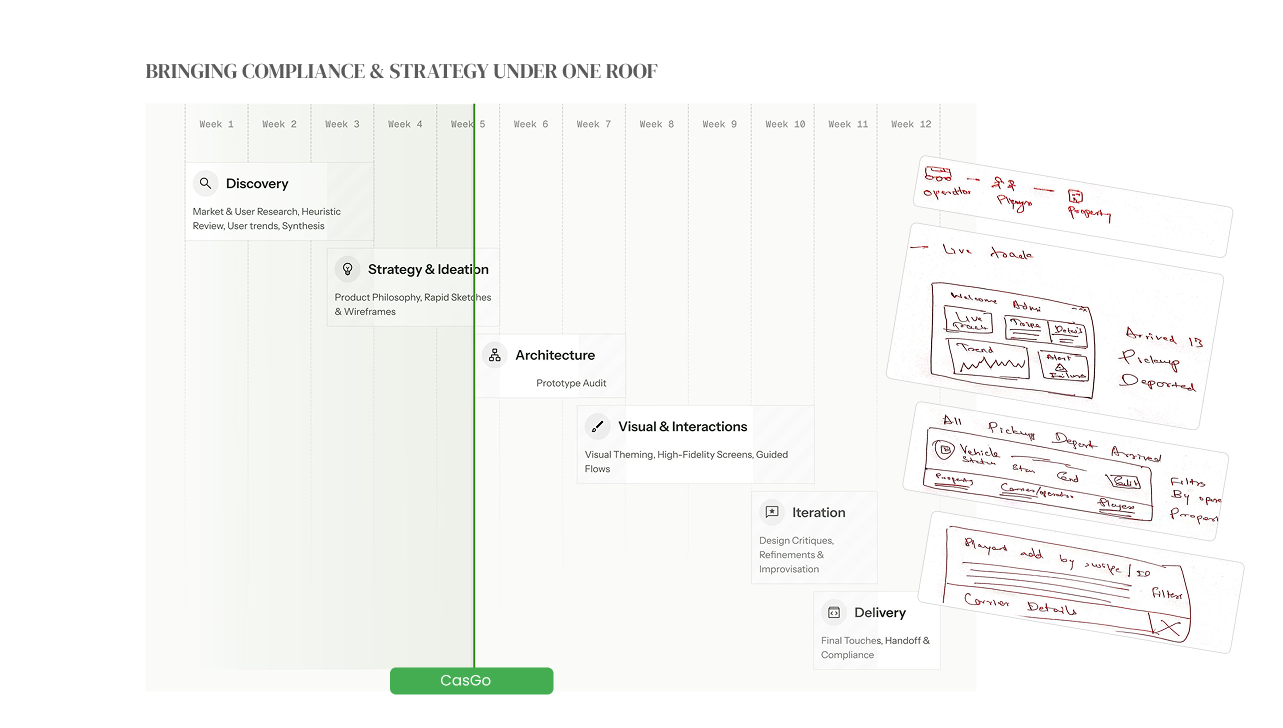
12-week process — Discovery, Strategy, Architecture, Visual design, Iteration, Delivery
Rather than a feature list, CasGo was designed around 5 real admin workflows — the jobs to be done that Andrew and his peers actually performed every day. Each workflow was scoped from research findings, not assumed from a feature brief.
Register transport operators with document tracking, vendor details, and active/inactive status — replacing hours of manual verification with a structured onboarding form and live record.
Link operators to specific properties and schedule types (weekend, weekly, monthly, yearly) in a 2-step flow — Agreement Details → Schedules. No more checking physical books.
See all shuttle runs — picking up, departed, arrived — with live status tags and player counts. Add players via swipe card or universal ID scan directly from the scheduling view.
Live map tracking, trip detail feed, occupancy trend charts, and automatic failure alerts — all on the dashboard, filtered by property. The admin doesn't need to call anyone to know what's happening.
Historical data across trips, operators, and vehicles — surfaced in context, not buried in a separate reporting module that nobody opens.
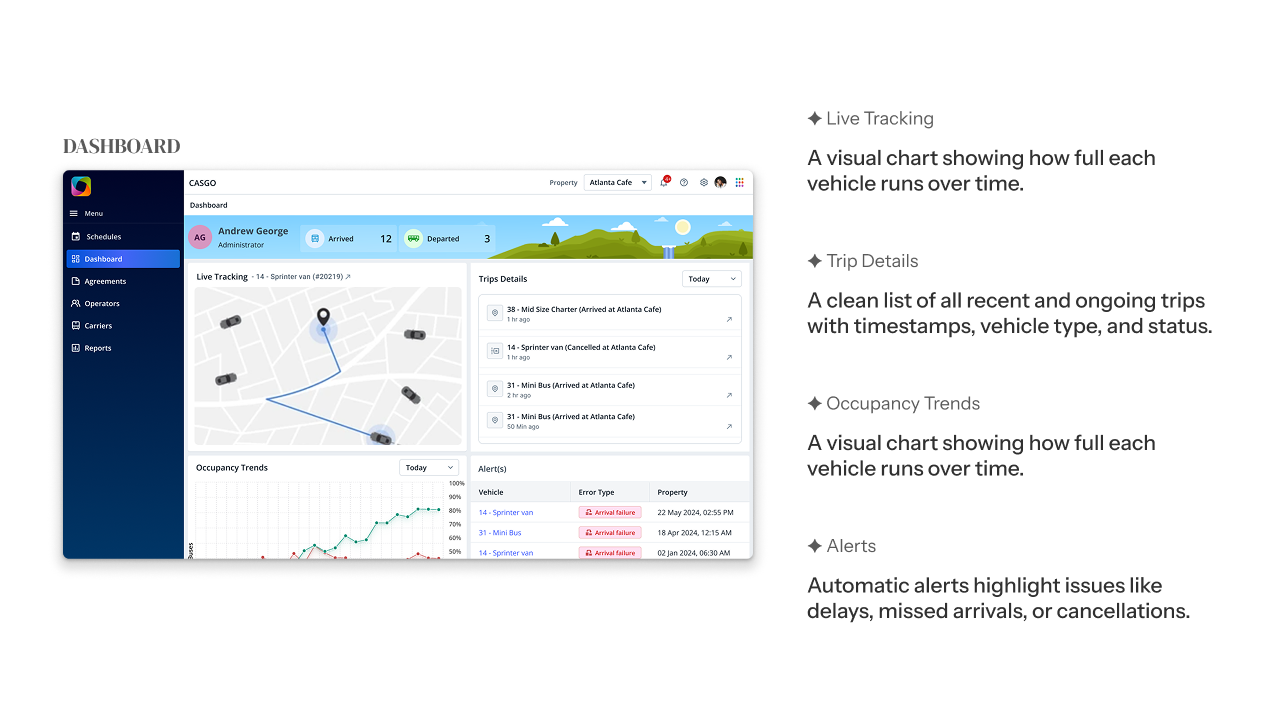
Dashboard — live vehicle tracking, trip feed, occupancy trends, and arrival failure alerts
The navigation mirrors the actual sequence of admin tasks — Operators → Agreements → Scheduling → Dashboard → Reports. This wasn't an arbitrary order; it maps the sequence in which a new admin would set up the system and the priority order in which an existing admin would use it daily.
Every vehicle and trip has a persistent status tag — Picking Up, Departed, Arrived, Failed. Status is never hidden in a detail view; it's visible at the list level. When something goes wrong, the admin sees it without drilling in.
Agreement setup is the most complex form in the system. Breaking it into Agreement Details and Schedules as two distinct steps reduced cognitive load and error rate. A long single-page form would have caused form abandonment — confirmed by early wireframe testing with stakeholders.
Rather than requiring an admin to notice a missed trip themselves, the dashboard surfaces failure alerts automatically. This turns a reactive problem (discovering a missed pickup after the fact) into a proactive one (being notified in time to act).
All operator records, agreements, schedules, and live tracking in one platform. No more cross-referencing spreadsheets and group chats.
Admins can see every active vehicle's status and location without calling the driver or waiting for a check-in.
Structured operator records with document tracking replaced manual verification that previously took hours per new operator.
Missed trips and arrival failures are surfaced automatically — turning a reactive problem into one that can be acted on in time.
The goal wasn't to add more features, but to reduce friction in everyday tasks. Every screen was evaluated against a real admin job, not a hypothetical use case.
Numbers are useful only when they're presented meaningfully, at the moment of decision-making. Occupancy trends on the dashboard mean something; in a monthly report, they're noise.
This project connected people, vehicles, routes, operators, agreements, schedules, and reporting. Designing meant thinking in relationships, not screens — understanding how each part affects the others.
This project reminded me that good UX is not about making screens look pretty — it's about understanding the messy real world, and simplifying it.